






A polished warning threatens lost wallet access unless users update before September 15
A convincing Ledger-branded email is circulating with an urgent device-update deadline, but the message is phishing and should not be trusted.
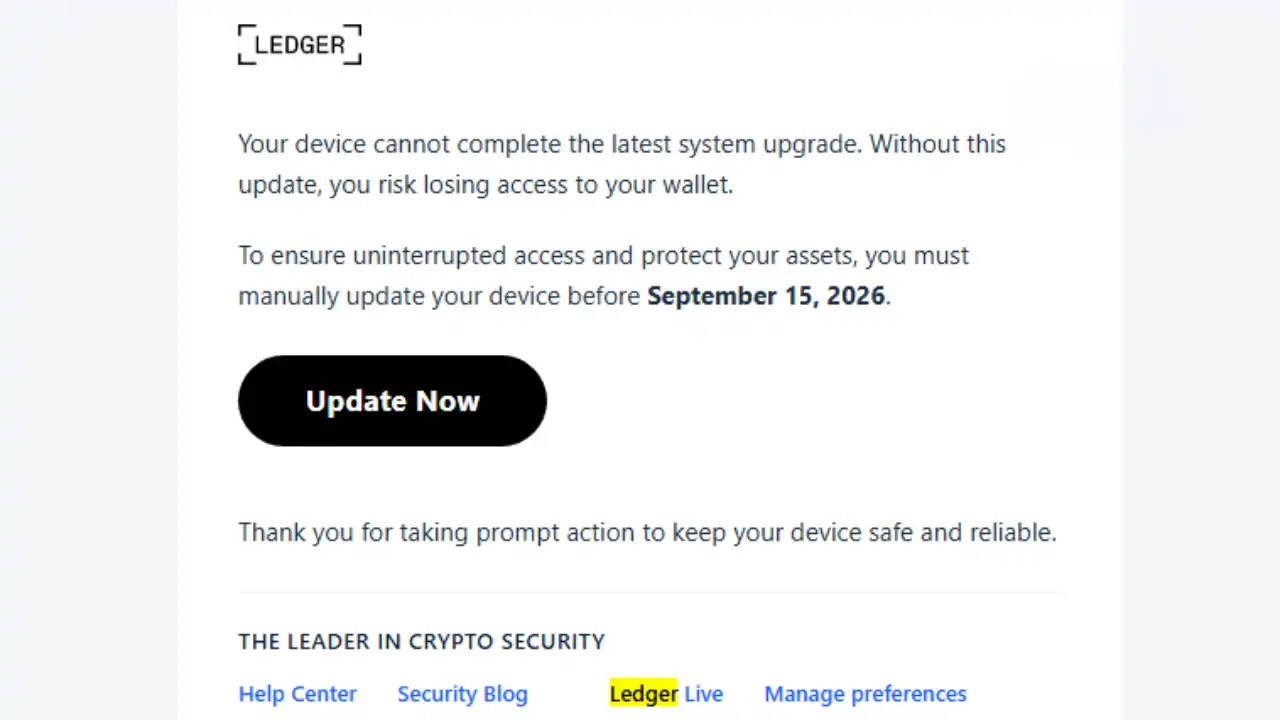
Fix Gaming Channel received an email with the subject “Important Update to Protect Your Device” on September 8, 2026. It claims that the recipient’s device cannot complete the latest system upgrade and warns that, without an update, they could lose access to their wallet.
The message tells the recipient to “manually update” the device before September 15 and places a prominent “Update Now” button beneath the warning. It carries Ledger branding, a professional-looking footer, and links labeled as official resources.
The presentation is clean, but the details expose it. The visible sender is noreply@alchemer.com, not a Ledger address, and the visible recipient line shows noreply@wallet.ledger.live. Proton Mail also displayed a prominent warning that the message had been flagged as suspicious.
It follows the same pressure-first approach seen in increasingly polished Steam and Discord scams and fake FACEIT verification pages: copy trusted branding, create urgency, and push the recipient toward one dangerous click.
Want more scam alerts and security warnings?
Get practical warnings about phishing, malware, account theft, and other threats affecting players and creators from Fix Gaming Channel.
Join Our Newsletter
Stay updated with the latest interviews, previews, and indie gaming news.
Ledger says it does not send firmware-update emails
Ledger directly addresses this tactic on its official phishing-campaign page. The company says it does not send emails asking users to update device firmware or the operating system.
The same guidance lists @ledger.fr, @ledger.com, @ledgerwallet.com, and @ledger.zendesk.com as authentic Ledger domains. The @alchemer.com address visible in this message is not on that list.
Ledger also states that it cannot and will not deactivate a user’s device. That directly undermines the email’s attempt to make the recipient believe that missing its deadline could cut off wallet access.
The same subject line has already been reported
This campaign did not begin with the September email. The Netherlands-based Fraudehelpdesk catalogued “Important Update to Protect Your Device” as a false Ledger email on July 29 and again on August 21, 2026.
Earlier versions used similar language about keeping a hardware wallet secure, improving performance, or avoiding restricted access. The dates and wording can change, but the central tactic remains the same: make an unsolicited update sound essential and time-sensitive.
What could happen after clicking?
Fix Gaming Channel did not follow the “Update Now” link, so its final destination has not been verified. A visible link label does not prove where a button really leads.
Ledger warns that fake update messages can direct users to counterfeit versions of Ledger Wallet, formerly known as Ledger Live, or to phishing websites. These may attempt to obtain the user’s 24-word Secret Recovery Phrase or trigger a transaction on the hardware device.
This is also why familiar branding cannot be treated as proof. As seen in a separate crypto scam warning involving Discord, logos, polished graphics, and convincing screenshots can all be used as bait.
What to do if this email reaches your inbox
- Do not click the update button, download a file, connect a wallet, or approve a transaction.
- Mark the message as phishing and delete it. Do not mark it as legitimate.
- If you want to check for a real update, open your already-installed Ledger Wallet application directly or type ledger.com into the browser yourself.
- Never enter the 24-word Secret Recovery Phrase into a computer, website, mobile application, or support form. Ledger says it should only ever be entered directly into the hardware device.
- Use the reporting instructions on Ledger’s official phishing page if you want to submit the suspicious email for investigation.
If you already clicked the button
Opening a link does not automatically prove that the wallet has been compromised. Close the page, do not connect the device, do not approve anything, and remove any file that was downloaded without opening it.
If you installed software, approved an unfamiliar transaction, or entered the Secret Recovery Phrase, treat the situation as urgent. Stop using the suspicious website or application and contact Ledger through its official support site. A recovery phrase entered outside the hardware device should be considered compromised. Follow Ledger’s official instructions for creating a new phrase and transferring assets using a clean, trusted setup.
The safest response to this email is simple: do not use its button. Verify updates from inside the official application, and never allow an urgent deadline to make the decision for you. More current warnings can be found through our Security & Scam Alerts coverage.
Related Reading
Steam and Discord Scams Are Getting Smarter in 2026
Security & Scam Alert: Fake FACEIT Verification Pages Target Steam Players
Scam Alert: Suspicious Discord Tag Mirrors a Familiar Crypto Trap
Written by Ronny Fiksdahl, Founder & Editor-in-Chief of Fix Gaming Channel.
Send interview pitches, corrections, tips, or developer stories to contact@fixgamingchannel.com.
Support independent games coverage on Ko-fi.