A webcam-powered control layer that turns natural movement into game inputs makes Tiltility feel less like a novelty and more like a genuinely unusual PC tool.
Tiltility Giveaway
We’ll soon be giving away a limited number of Tiltility Steam keys through Fix Gaming Channel. It will be first-come, first-served. When it goes live, enter through our contact form, tick the newsletter box, and tell us your favourite game in the message. Thank you for your support.
Tiltility is not a game in the usual sense. It is a utility built for players who want a different way to interact with PC games, using a standard webcam to detect subtle head or upper-body tilts and convert them into live inputs. That makes it one of those Steam releases that instantly stands out, not because it promises a massive world or a dramatic story, but because it tries to change the way control feels.
It also fits into the same wider PC conversation as setup-focused coverage and unusual gaming tools, much like the troubleshooting angle in our Why Your New Game Keeps Crashing on PC piece. With Tiltility, the hook is simpler and stranger at the same time: your body becomes part of the input.
Tiltility
Release: March 20, 2026
Genre: Utilities
Developer / Publisher: Hedeshy
Platforms: Windows PC (Steam)
Tiltility – Lightweight Desktop Utility Trailer
Join Our Newsletter
Stay updated with the latest interviews, previews, and indie gaming news from Fix Gaming Channel.
What is Tiltility?
Tiltility is a webcam-powered desktop utility for gamers. Its main job is to detect natural body movement, especially subtle head or upper-body tilts, and turn that movement into keyboard actions. The press kit also highlights six core hand gestures in the base version, giving players simple gesture-to-key mapping out of the box without needing special hardware beyond a normal webcam.
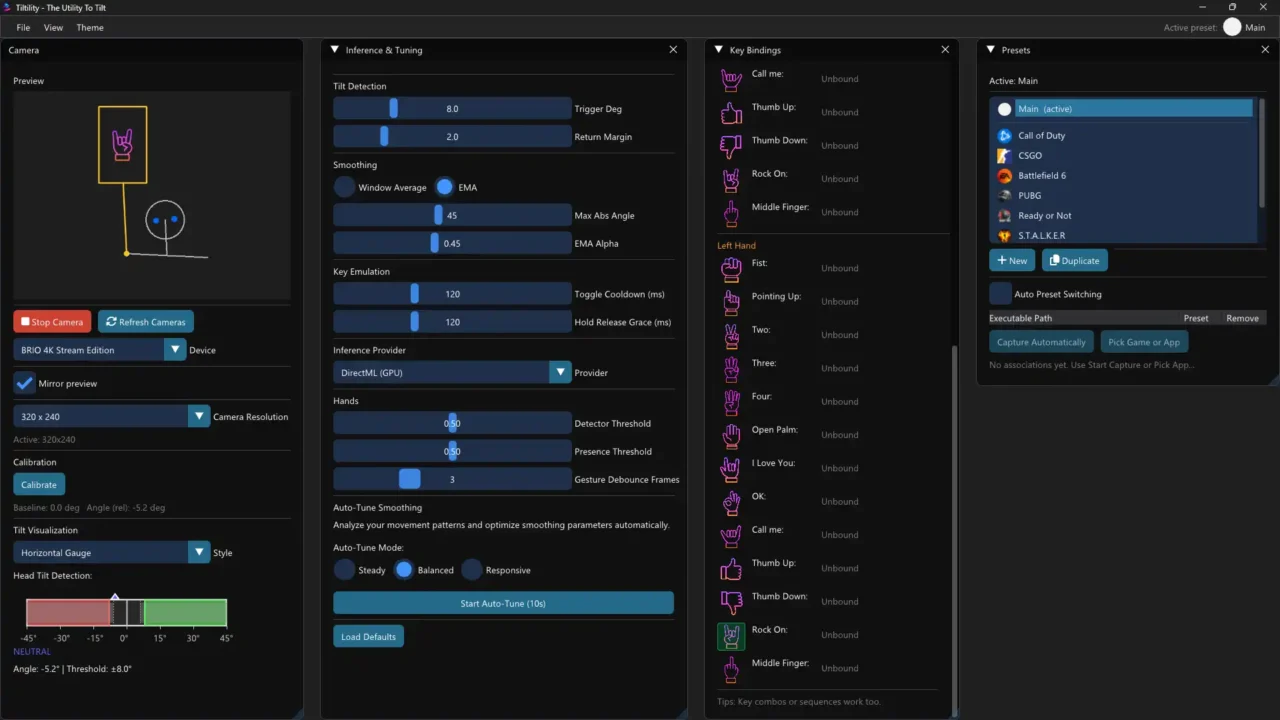
Tiltility’s interface shows webcam preview, tilt calibration, gesture bindings, and per-game presets in one layout.
That may sound small, but it changes the feel of certain games immediately. Instead of reaching for extra keys to lean or trigger an action, you move the way your character might move. In the right setup, that can make peeking, leaning, and directional actions feel a little more physical and a little less detached.
Tiltility is also positioned as a low-overhead background tool rather than a bloated front-end. The software is described as working with standard webcams, running locally, and being built around privacy rather than cloud processing. That is important, because anything involving camera-based input immediately raises questions about practicality and trust.
Are there any guides for Tiltility?
Yes, but this is still early. Right now, the most useful guide source is the official user manual. That is the best place to start if you want clear setup help, because Tiltility is not the kind of tool where it makes sense to pretend there is already a huge library of community walkthroughs around it.
The manual is important because Tiltility is the kind of software that will live or die on setup quality. If your camera position is bad or the calibration is off, the whole thing will feel awkward. If the read is clean and the bindings make sense, the idea becomes a lot easier to appreciate.
How to get started
The smartest way to begin is to keep it simple. Do not try to map everything immediately. Start with one or two obvious actions, like leaning left and right, and test those in a game where the payoff is easy to notice. Tactical shooters are the most obvious fit, but that is not the only option. The press material also points toward immersive sims, racing games, and other genres where a more natural physical link between movement and input can add something.
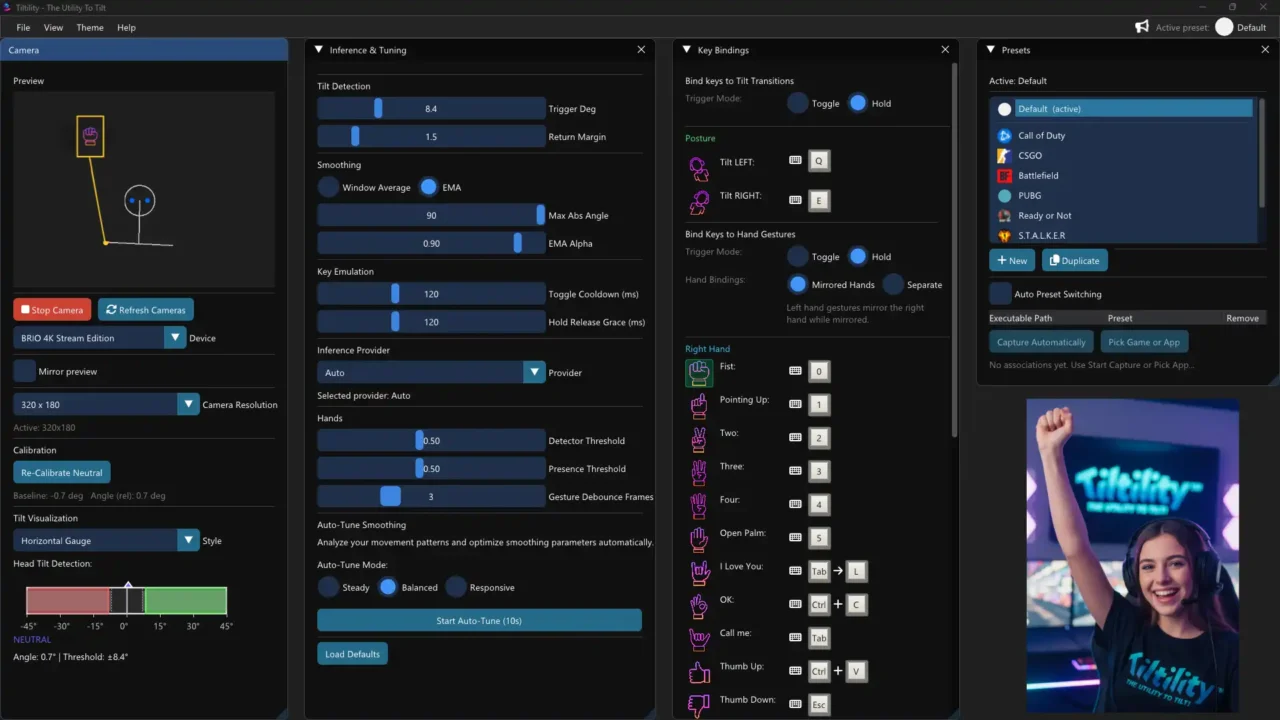
Tiltility also supports controller-style bindings and game-specific presets, making the tool more flexible than a simple webcam input experiment.
It is also worth keeping expectations realistic. Tiltility is described as broadly compatible with PC games, but the fact sheet notes that some titles do not accept emulated inputs or controller-style input layers, which means compatibility will not be identical across every game. That is a fair limitation to mention, and honestly, one that makes the article more useful.
For streamers, one of the more practical notes in the fact sheet is that you do not necessarily need two webcams. Windows can allow one camera feed to be shared across multiple apps, so it is possible to use OBS and Tiltility together through the multi-app camera option if your setup supports it. That is the kind of detail that makes the press-kit material genuinely helpful rather than just promotional.
The Handy Pack DLC
There is also a Handy Pack DLC tied to Tiltility. It expands the gesture side with more expressive options like thumbs up, thumbs down, the okay sign, and rock ’n’ roll, while also adding left and right hand separation so the same gesture can trigger different actions depending on which hand performs it.
That might sound like a small extra on paper, but it gives Tiltility more flexibility for players who want more than simple lean inputs. It also pushes the tool a little further into the space between gaming utility, streaming control, and general creative workflow support.
Why Tiltility stands out
Part of the reason Tiltility feels more interesting than a random Steam oddity is the developer behind it. Ramin Hedeshy is not coming from nowhere. The press kit frames him as a Human-Computer Interaction researcher with a PhD from the University of Stuttgart and as the former CTO and co-founder of Semanux, which built hands-free computer access technology used by people with disabilities. That background makes Tiltility feel less like a gimmick and more like an extension of long-term work around natural, human-centered interaction.
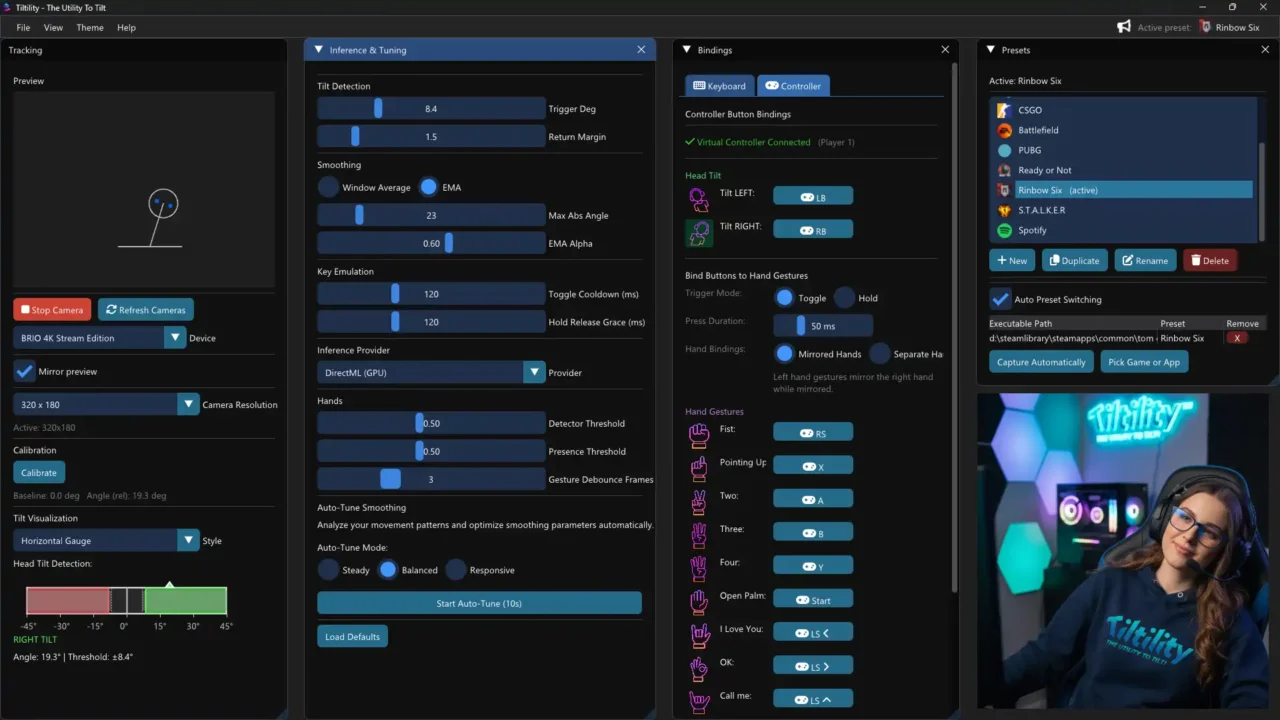
A practical Counter-Strike preset shows how Tiltility can map tilts and hand gestures to real in-game actions.
The screenshots also help show that Tiltility is more than a rough concept. There are per-game presets, detailed tuning controls, gesture bindings, calibration tools, and even separate controller-based mappings. That gives the software more weight as a serious utility rather than a one-note experiment.
That does not automatically make the tool perfect, of course. Like any movement-based system, it still has to prove itself in real use, and some players will likely find it more practical than others. But it does give Tiltility a more serious foundation than many experimental PC utilities ever get.
Final thoughts
Tiltility probably will not be for everyone, and it does not need to be. What matters is that it has a clear identity. It is a utility, not a game. It is trying to make interaction feel more natural, a little more physical, and a little less tied to yet another spare keybind.
For players who enjoy testing new control ideas, the concept is easy to understand. For everyone else, the most useful takeaway is simple: if you were searching for a Tiltility guide, the best starting point right now is the official manual, and the best way to judge the software is to keep your first setup small, practical, and realistic.
Related Reading
Written by Ronny Fiksdahl, Founder & Editor of Fix Gaming Channel.
Enjoy our content? Support Fix Gaming Channel with a donation via
Buy Me a Coffee to help keep independent game journalism alive.