
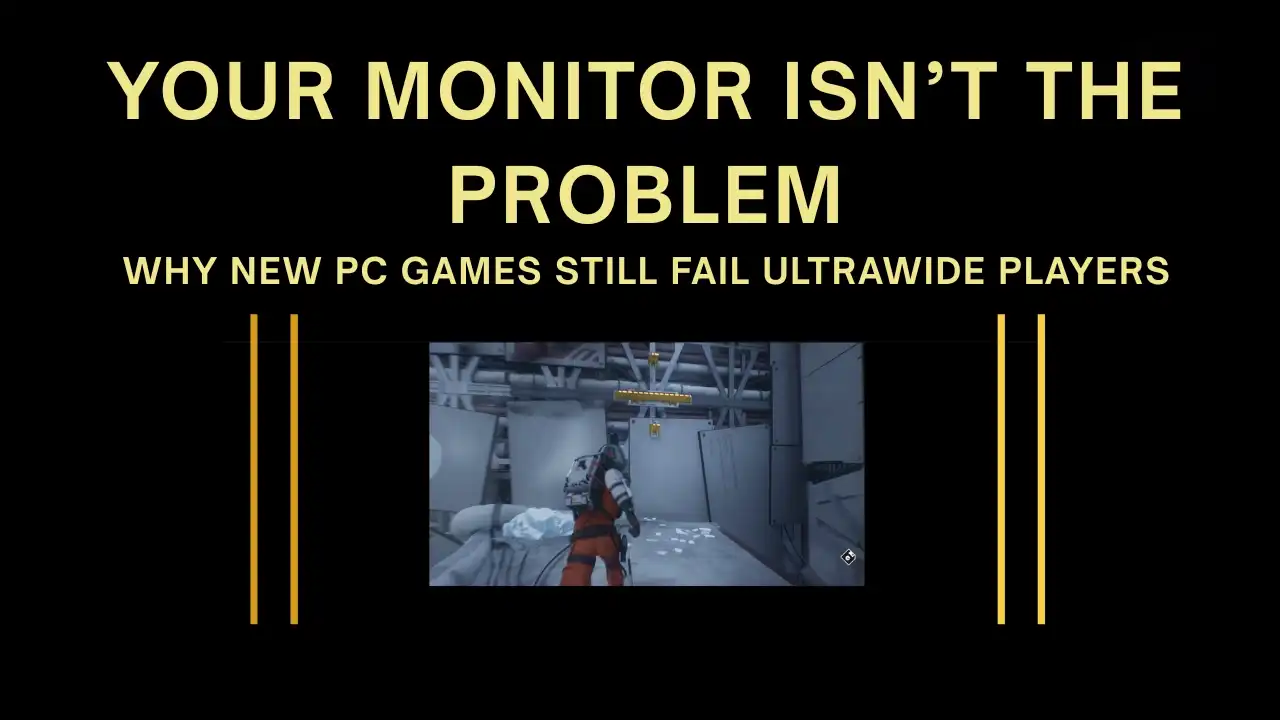
You bought the monitor. The game still acts like it does not exist.
This is the part that annoys me. You can sit there with a powerful PC, an expensive ultrawide or super ultrawide monitor, and a full-price AA or AAA game, only for the game to throw black bars on the screen like your setup is the problem.
It is not.
For players using 21:9 or 32:9 displays, weak ultrawide support is not a tiny visual complaint. It changes how the game feels. Cutscenes snap back to 16:9. HUD elements sit in the wrong place. Menus look awkward. Some games technically run at the resolution, but the presentation makes it clear the wider screen was never properly tested.
That is frustrating enough on its own. But it gets worse when smaller indie games often handle ultrawide and super ultrawide better than major releases with far bigger teams, bigger budgets, and premium price tags.
At that point, it stops feeling like a technical limitation and starts looking like lazy PC implementation.
The real issue is not that modern engines cannot draw a wider image. Unreal Engine, Unity, and other modern tools can support flexible cameras, UI scaling, safe zones, and wider aspect ratios. The bigger problem is that many games are still built, framed, optimized, and tested around 16:9 first. Once that happens, ultrawide support becomes more than a resolution option. It becomes a full content-integration problem.
We have seen this from the player side on Fix Gaming Channel as well. Our own Aphelion 32:9 ultrawide test showed how quickly atmosphere, presentation, and player comfort can be affected when a game does not fully support super ultrawide screens. That is why this matters alongside broader PC coverage, whether it is a major release like DOOM: The Dark Ages, hands-on coverage like Subnautica 2, or our ongoing focus on games that respect different ways to play on PC.
Ultrawide support does not always mean proper support
One of the biggest problems is how vague the words “ultrawide support” have become. A game can support 21:9 during gameplay but still lock cutscenes to 16:9. Another game can fill a 21:9 display but break at 32:9. Some titles stretch UI elements, crop the field of view, place menus badly, or rely on community fixes to do what the official PC version should have handled from day one.
Proper support should mean the gameplay camera works, the HUD scales correctly, menus are usable, subtitles are placed sensibly, cutscenes do not suddenly slap black bars on the screen, and 32:9 players are not left searching forums before they can play the game the way their monitor was built to display it.
Our own 32:9 testing shows the problem fast
This is not just a theory from reading patch notes or community fixes. Testing games in 32:9 makes the problem obvious very quickly. Some games feel built for the format. Others technically run, but the presentation breaks down through black bars, bad HUD placement, awkward menus, or cutscenes that ignore the rest of the screen.
That is why we keep testing games in super ultrawide on Fix Gaming Channel. A game can feel very different when played on a 32:9 monitor, and players deserve to know whether the support is real, partial, or missing before they buy.
Problem Example: When 32:9 Support Fails
Join Our Newsletter
Stay updated with the latest interviews, previews, and indie gaming news from Fix Gaming Channel.
Good Example: 32:9 Super Ultrawide Gameplay Done Better
Good Example: More 32:9 Super Ultrawide Testing
Why bigger games still struggle
It is easy to say, “Just support ultrawide.” From the player side, that frustration is fair. But from the production side, ultrawide support is often not one switch. It touches cameras, FOV behaviour, UI placement, subtitles, pre-rendered videos, letterboxed cinematics, photo modes, performance budgets, online fairness, and QA testing.
A wider aspect ratio shows more than extra image area. It can reveal more of the world. That means objects, animations, effects, enemy behaviour, shadows, and post-processing at the edges of the frame may suddenly become visible in ways the game was not designed around. At 32:9, the screen can reveal things the original 16:9 camera framing was hiding.
That is why some games can look “almost supported” and still feel wrong. The image may fill the screen, but the HUD sits too far out. Menus may scale badly. Subtitles may feel awkward. Cutscenes may work in one scene and break in another. The game may technically run in the resolution, but the experience still feels unfinished.
AAA studios also have a much larger content surface to validate. They are testing far more than one gameplay mode: menus, cinematics, accessibility options, localization, controller layouts, keyboard and mouse behavior, PC settings, console versions, multiplayer systems, patches, and certification requirements.
That does not make the problem acceptable. It just explains why some major releases still fail at something players expect to be standard on PC.
The numbers may look small, but they still mean millions
There is also a business angle. According to the Steam Hardware & Software Survey for April 2026, 1920×1080 remains the dominant primary display resolution at 52.21%, while 2560×1440 sits at 21.41%. Ultrawide 3440×1440 is listed at 3.14%, and 5120×1440 is listed at 0.41%.
Those percentages may look small at first, but they are not tiny in real player terms. Steam’s survey is optional and anonymous, so this cannot be treated as an exact headcount. But if those percentages are applied to Steam’s large monthly active user base, 3440×1440 and 5120×1440 users likely represent several million players combined. That is not everyone, but it is far from nobody.
And 32:9 users may be a smaller group, but they are often exactly the kind of high-end PC players who buy premium hardware, test performance, record videos, stream, review, and talk loudly when a port feels undercooked.
Community fixes should not be the answer
Community fixes are one of the best things about PC gaming. Tools and mods can remove black bars, unlock FOV, reposition HUD elements, and make games work better on displays the original release ignored. For single-player games, this can be a lifesaver.
But community fixes also show the problem. If a game needs a mod to remove black bars, correct FOV, or stop the HUD from stretching, then the official PC version did not fully do the job. And when anti-cheat or online systems are involved, the situation becomes more sensitive.
A black-bar remover may be harmless in a single-player game, but a tool that hooks into a protected online game can become risky. Players should not have to wonder whether making their monitor work properly might trigger anti-cheat concerns. Developers should handle display support officially, clearly, and safely.
Some games prove it can be done
The frustrating part is that some PC versions do handle wider displays well. When a game supports 21:9, 32:9, clean HUD placement, readable menus, and sensible cutscene behaviour, players notice immediately. The experience feels like a real PC version, not a console-first release stretched into a settings menu.
This is also where indie games often surprise me. Not every indie game gets it right, but smaller teams often have fewer authored cutscenes, fewer fixed-layout UI screens, fewer platform constraints, and more direct PC-first priorities. When a small game respects my monitor, I expect a major PC release to at least try.
Developers and reviewers need to be clearer
Reviews and PC impressions should stop using “ultrawide support” as a simple yes-or-no line. That is not enough anymore. Players need to know whether gameplay supports 21:9 and 32:9, whether cutscenes are full-width or locked to 16:9, whether the HUD scales correctly, whether menus and subtitles are placed properly, and whether a community fix is required.
Developers should be just as clear before launch. If a game supports 21:9 but not 32:9, say it. If gameplay supports ultrawide but cutscenes are locked to 16:9, say it. If competitive multiplayer uses a fixed FOV for fairness reasons, explain it before launch.
Players can accept honest limitations much more easily than discovering them after paying. The problem is missing support and the silence around it.
A premium PC release should respect premium PC hardware
Nobody is saying every game must be perfect on every setup. But ultrawide and super ultrawide support should not feel like a bonus feature in modern PC gaming. It should be part of the basic PC checklist, especially for AA and AAA releases asking players to pay premium prices.
The sharp version is simple: if indie games can often make wider displays work, major PC releases should not still be hiding behind black bars, broken HUDs, locked 16:9 cutscenes, and community fixes. PC players are not asking for magic. They are asking for the screen they paid for to be treated like it exists.
Ultrawide support is usually easy in the engine but expensive in the game. That is the real answer. But if developers plan for ultrawide and 32:9 early, they do not need to burn time and energy patching broken presentation later. Smart support starts before launch, not after players complain.
Related reading on Fix Gaming Channel
- Aphelion 32:9 Ultrawide Test: Strong Atmosphere, But No Ultrawide Support
- Top 10 Super Ultrawide Games Tested in Raw 32:9 Gameplay
- Seven 32:9 Super Ultrawide Games You Need to See in 5K
- PS5 With an Ultrawide Monitor? I Tested Cyberpunk 2077 on a 32:9 Screen
Written by Ronny Fiksdahl, Founder & Editor-in-Chief of Fix Gaming Channel.
Send PC gaming tips, corrections, review notes, or developer stories to contact@fixgamingchannel.com.
Support independent games coverage on Ko-fi.