






Battlefield 6 Secure Boot Error – How to Fix on Steam
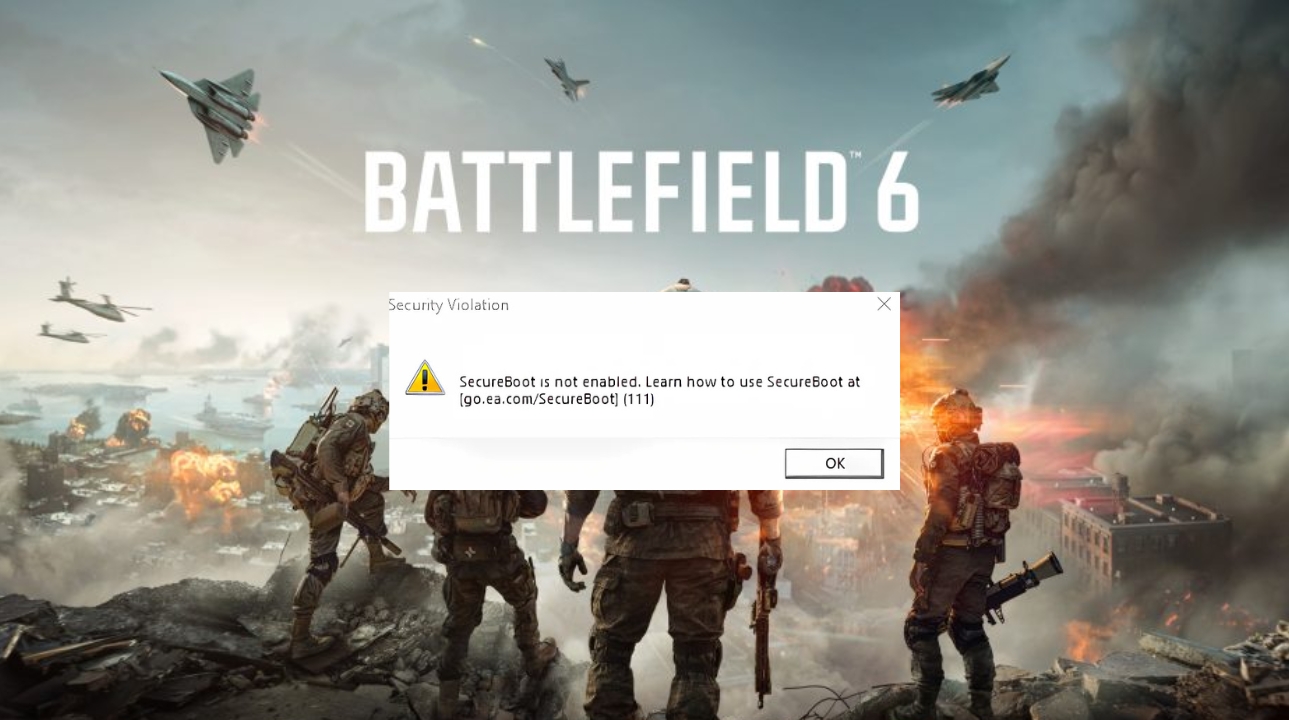
EA’s anti-cheat for Battlefield 6 requires UEFI Secure Boot to be enabled on PC, even if you are playing through Steam. If Secure Boot is off, the game may refuse to launch and show a Secure Boot error before loading.
This guide covers how to check your Secure Boot status in Windows and how to enable it on a Gigabyte motherboard. If you want more background on the original beta rollout, you can also read our earlier coverage here: Battlefield 6 Open Beta – August 2025.
Important: BIOS menus can differ depending on your motherboard and firmware version. If your Windows drive is still using Legacy/MBR instead of UEFI/GPT, do not change random BIOS settings without backing up important files first.
Join Our Newsletter
Stay updated with the latest interviews, previews, and indie gaming news from Fix Gaming Channel.
Step 1: Check if Secure Boot is disabled
- Press Win + R, type
msinfo32, and press Enter. - In the System Information window, select System Summary.
- Look for BIOS Mode. Ideally, this should say UEFI.
- Look for Secure Boot State:
- If it says On, Secure Boot is enabled.
- If it says Off, follow the steps below.
- If it says Unsupported, your system may be using Legacy/MBR mode or unsupported firmware settings.
Step 2: Enable Secure Boot on Gigabyte motherboards
The example below is based on a Gigabyte B650M AORUS ELITE AX setup, but the process is similar on many Gigabyte boards. Menu names may vary slightly depending on your BIOS version.
- Restart your PC and tap the DEL key repeatedly to enter BIOS.
- Press F2 to switch to Advanced Mode.
- Go to BIOS → CSM Support → set it to Disabled.
- Save and reboot back into BIOS.
- Go to Settings → Miscellaneous or Boot → Secure Boot.
- Set Secure Boot to Enabled.
- Set Secure Boot Mode to Standard, not Custom.
- Save and exit with F10.
- After Windows loads, run
msinfo32again and confirm that Secure Boot State now says On.
Battlefield 6 Secure Boot Video Guide
Rumble videos require Embedded media consent. Allow it in Cookie settings, then choose Load Video, or open the video on Rumble.
Fix Gaming Channel video guide showing the Secure Boot setup process.
Important notes before changing BIOS settings
- Secure Boot requires UEFI mode.
- Your Windows boot drive normally needs to use GPT, not Legacy/MBR.
- If your system is still using Legacy/MBR, back up important files before attempting any conversion or BIOS changes.
- This requirement applies to PC players regardless of whether they launch through Steam, the EA app, or another supported PC storefront.
- If Secure Boot shows as enabled in BIOS but still says Off in Windows, restart once more and check
msinfo32again. Some systems only show the correct state after a full reboot.
More info: You can also check EA’s official Secure Boot help page here: EA Secure Boot Guide.
Related Reading
Battlefield 6 Open Beta – August 2025
More gaming news and guides on Fix Gaming Channel
Written by Ronny Fiksdahl, Founder & Editor-in-Chief at Fix Gaming Channel.
Send interview pitches, corrections, tips, or developer stories to contact@fixgamingchannel.com.
Support independent games coverage on Ko-fi.