


Some PC games make ultrawide feel worth it. Others only pretend to.
Related coverage: Seven 32:9 Super Ultrawide Games You Need to See in 5K.
Ultrawide support is not just about filling the screen. The real test is whether the game still feels right when the HUD, camera, menus, gameplay, and cutscenes leave the normal 16:9 box behind.
Ultrawide gaming can be one of the best upgrades in gaming when a game handles it properly. A 21:9 or 32:9 monitor can make open worlds feel larger, racing games feel faster, shooters feel more readable, and cinematic action games feel closer to the big-screen experience they are clearly aiming for.
But support and experience are not the same thing. Many games run in ultrawide resolutions, but that does not mean they feel designed for ultrawide. Some keep the HUD in awkward places. Some stretch menus. Some handle gameplay well, then shrink the cutscenes into a boxed image in the middle of the screen.
On a 49-inch native 5120×1440 display, that problem is impossible to ignore. Ultrawide can look incredible — until the cutscene starts.
Marvel’s Spider-Man Remastered
Marvel’s Spider-Man Remastered is one of the easiest examples to recommend because the PC version was clearly built with wider displays in mind. Swinging through New York depends on speed, height, movement, and a strong sense of space. Ultrawide makes that better.
The wider view gives the city more room to breathe. Buildings stretch further into the sides of the screen, movement feels smoother, and the sense of speed becomes stronger when the image is not trapped inside a normal 16:9 frame.
The Last of Us Part I
The Last of Us Part I is a different kind of ultrawide game. It is not about speed or competitive awareness. It is about atmosphere. The abandoned streets, overgrown interiors, quiet buildings, and long-distance environmental detail all benefit from a wider frame.
The PC version had a rough history with performance at launch, so this should not be framed as a perfect PC port in every area. But for ultrawide presentation, The Last of Us Part I is still a strong pick.
F1 24
Racing games are one of the most obvious genres for ultrawide, and F1 24 is one of the better examples because the extra width has a clear purpose.
In a racing game, the wider view is not just cosmetic. It helps the sense of speed, track positioning, cockpit awareness, and corner approach. If you play from cockpit or near-cockpit views, the screen starts to feel less like a window and more like part of the car.
God of War PC
God of War on PC is a good ultrawide pick, but it needs to be described honestly. This is best treated as a 21:9 showcase, not a full 32:9 example.
The no-cut camera, over-the-shoulder combat, quiet travel moments with Kratos and Atreus, and huge Norse landscapes all benefit from a wider frame. Good for ultrawide, excellent for 21:9, but not the strongest pick for a 49-inch 32:9 setup.
Join Our Newsletter
Stay updated with the latest interviews, previews, and indie gaming news.
Red Dead Redemption 2
Red Dead Redemption 2 is not here because ultrawide was its main selling point. It is here because the game’s world is one of the best arguments for playing open-world games on a wider screen.
The landscapes, towns, forests, mountains, camp scenes, horse riding, and weather all become more impressive when the image stretches beyond a standard frame. It is better described as a game that looks incredible on ultrawide when the presentation behaves, not as an ultrawide-first showcase.
Cyberpunk 2077
Cyberpunk 2077 is one of the strongest games on this list for ultrawide because Night City is built around density, lights, scale, interiors, roads, crowds, and vertical detail.
Driving through the city on a 32:9 display can look fantastic. Markets, clubs, backstreets, and corporate spaces also benefit from the wider frame because there is often something happening at the edges of the image. It belongs in the caveat group, though: great ultrawide feeling, but not flawless presentation everywhere.
Night City is one of the clearest examples of why ultrawide can make a dense open world feel bigger and more immersive.
Battlefield 6
Battlefield 6 is one of the strongest modern examples because ultrawide makes sense for the type of game it is. Large-scale shooters benefit from awareness. Vehicles, destruction, smoke, squad movement, buildings, and open combat spaces all become easier to read when the screen gives you more horizontal information.
This is also where PC options matter. Ultrawide players need more than a resolution option. They need HUD scaling, camera settings, performance options, and enough control to make the game feel right on different displays.
Large-scale shooters are one of the clearest cases where a wider screen can improve the sense of scale and battlefield awareness.
007 First Light
007 First Light is the most interesting game on this list because it shows both sides of the ultrawide problem. During gameplay, a modern James Bond game should feel great on an ultrawide monitor. The stealth, movement, action, driving, stylish interiors, and cinematic framing all sound like a perfect match for 21:9 or 32:9.
But then the cutscenes become the problem. When the gameplay fills the screen and the story scenes shrink into a smaller centered frame, the whole experience breaks. It can feel like the game supports your monitor only when you are in control, then forgets your display exists when the cinematic direction starts.
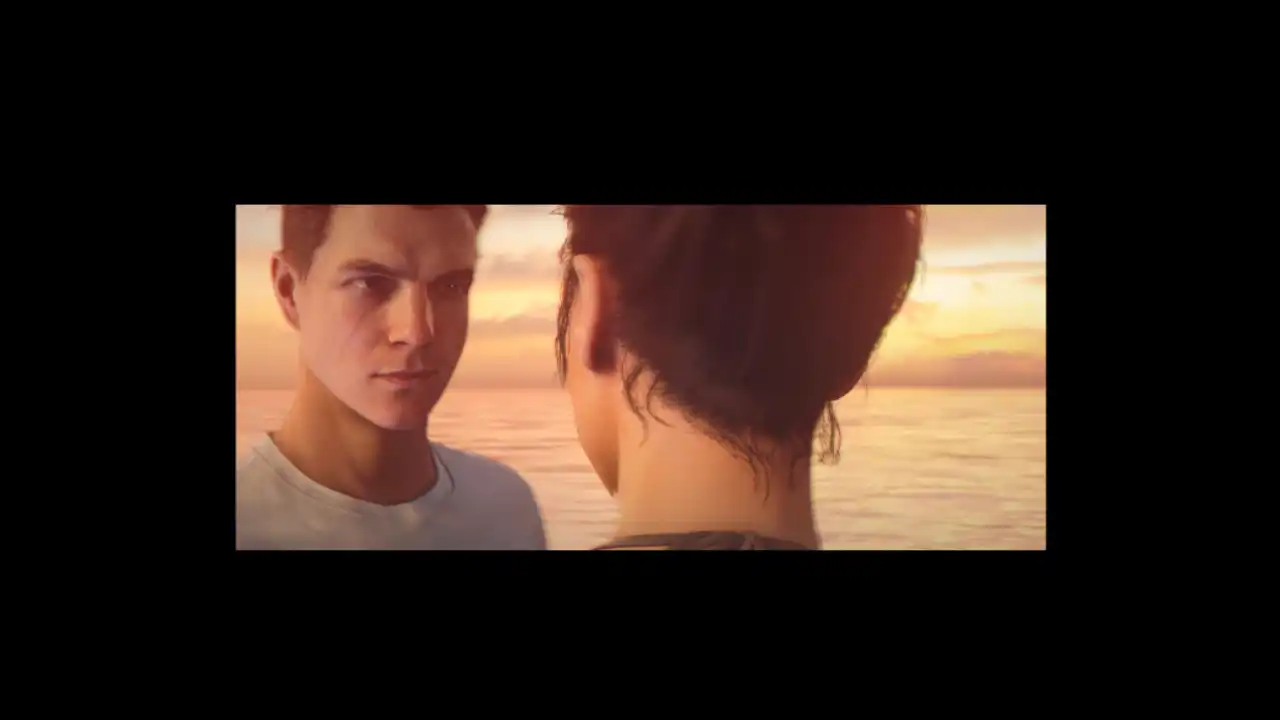
007 First Light shows the cutscene problem clearly. Gameplay can feel wide, but story scenes may still appear in a smaller boxed frame.
That makes 007 First Light a useful example, even if it is not the cleanest recommendation. It shows why ultrawide support should include the whole game, not only the parts where the player is moving.
This is where many ultrawide games still fail: gameplay may fill the screen, but cutscenes often fall back into a smaller boxed frame.
The cutscene problem is where many ultrawide games fail
The biggest ultrawide frustration is not always gameplay. Often, the gameplay looks great. The problem starts when the game switches to cutscenes. A game can feel huge and cinematic during normal play, then suddenly present the story in a small centered frame.
There are understandable reasons for this. Some cutscenes are framed for 16:9. Some pre-rendered videos were not made for wider displays. Some camera setups might reveal things the developer never intended players to see. But from the player’s side, the result is still the same: the ultrawide experience becomes inconsistent.
Ultrawide support should mean consistency
A good ultrawide game does not just fill extra space. It uses that space in a way that fits the game. Marvel’s Spider-Man Remastered uses it for movement and city scale. F1 24 uses it for speed and racing awareness. The Last of Us Part I uses it for atmosphere. Battlefield 6 uses it for battlefield readability.
But 007 First Light shows the other side. A game can look great in ultrawide during gameplay and still feel disappointing when the cinematic presentation shrinks into a box. That is the real point: ultrawide support goes beyond resolution. It is about consistency.
Written by Ronny Fiksdahl, Founder & Editor-in-Chief of Fix Gaming Channel.
Send interview pitches, corrections, tips, or developer stories to contact@fixgamingchannel.com.
Support independent games coverage on Ko-fi.